Generating DX Film Edge barcodes
When I wrote about scanning DX Film Edge barcodes, I mentioned you could now also generate them.
Let’s address the obvious question first: why? Why would anyone on earth want to generate these barcodes? They exist only on 35mm films, and manufacturers didn’t wait for an open-source library to print them in the 1980s. But I had two reasons.
The first reason is that being able to generate a known-good barcode on demand makes double-checking against actual films much easier. On the Big Film Database, I wanted to show the associated barcode for each film, so people could visually check it against their own collection.
The second reason is simpler: once you’ve reverse-engineered how to read something, why not close the loop by writing it back? It didn’t exist in open-source software yet.
Finding an existing library: Zint
As with the scanning software, I didn’t want to babysit a standalone tool that would quickly die, so the goal was to contribute to an existing, well-maintained project.
Also, like with ZXing-CPP, I wanted a low-level library that could be used in various contexts: high-performance or constrained systems, many programming languages, the web, etc. I found two libraries:
- ZXing-CPP, the C++ library I already contributed to, which mainly supports barcode scanning but also had some support for generating a few barcode types,
- Zint, a C library that was still active, with a very long list of supported barcodes, including some obscure ones.
Zint also has a Qt graphical interface I’d already used, plus many bindings, and the code seemed easier for me to contribute to. It was also a good excuse to work in a different language (yes, C and C++ are different languages). Since it supports some very niche barcodes, I figured it might accept a new one?
Algorithm: writing is easier than reading
When you read a barcode, you deal with the real world: blurry images, uneven lighting, skewed orientation, image-processing performance limits… Writing has none of that. Sanitizing a text input is much easier, and it’s basically about drawing black and white bars. The core algorithm is quite simple:
- Check the input format and whether it has an associated frame number,
- Draw the matching clock signal (the fixed pattern on top),
- Draw the corresponding data signal below: DX number, frame and half-frame bits, separators and parity bit (see this article),
- Generate the actual image in PNG or SVG format — but this is already handled by Zint.
Managing various input formats
I mostly had to pay close attention to the different input formats. Let’s take an example with a cassette that has the code 012663. I wanted to accept the following formats, which all produce the exact same DX Film Edge barcode:
- The DX Full code:
012663, - The DX Extract (the 4 middle digits):
1266, - The two-part DX number:
79-2.
* The DX full code’s first digit 0 indicates a variant of the film, and the last digit 3 indicates the number of exposures the cassette contains. Neither of these is included in the DX Film Edge barcode.
You can refer to my article that explains DX number, or to Wikipedia.
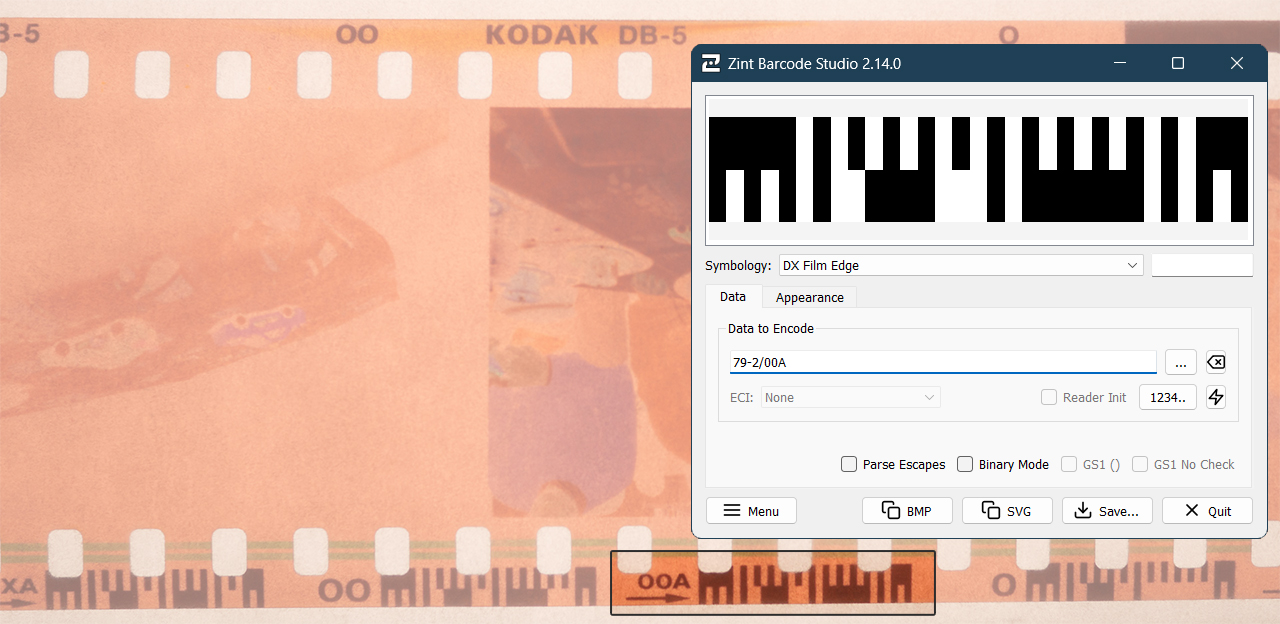
Getting it into Zint
As with ZXing-CPP, I didn’t want to drop a surprise merge request, so I simply opened a ticket asking if this addition would be welcome. And yes, it was! The maintainers were very friendly and gladly accepted it.
Zint and ZXing-CPP are closer than I expected
When writing the tests, I saw that the Zint library was actually testing the generated barcodes with a barcode scanner, ZXing-CPP, to make sure they matched the expected output. Which is very handy in my case, because I had added the DX Film Edge barcode scanning feature the year before.
But what I hadn’t noticed is that ZXing-CPP was experimenting with barcode generation, directly through the Zint API. Once my contribution was merged into Zint, ZXing-CPP was quickly able to generate DX Film Edge barcodes as well. Which is really nice, because when implementing both reading and writing on a website, a single dependency on the ZXing-CPP API is enough. I now use the Python binding to scan and generate barcodes for the Big Film Database, but there are many more bindings: Wasm, Flutter, etc.

Going further
DX Film Edge generation was added in Zint 2.14. You can use it in many ways: the libzint C library, the CLI, or the Barcode Studio GUI. And thanks to the bridge between Zint and ZXing-CPP, you can also use most ZXing-CPP bindings: Python, Rust, Kotlin, etc.
The updated package is already in most current distributions: Debian 13 Trixie, Ubuntu 25.10, Fedora 43, Arch, etc.
Feel free to look at the source code and to contact me if you have any questions or remarks. Note that most of this work is based on reverse engineering and I may have missed some points or specifications. I’ll be happy to discuss it with people who worked on this!
Thanks to Robin Stuart and Martin for maintaining Zint. We don’t thank open-source maintainers enough — they keep building the foundations of most software products, for free.